
You have a sharp subject and a messy photograph. Before you buy another lens or crop everything out, look at the shapes around the person. Improving your photography composition can start with moving until a column, a curve, or a diagonal helps explain the scene.
I’ve been making photographs for 30 years. Reviewing my work recently, I noticed how often I return to geometry. At the time, I wasn’t calculating a ratio. I liked the relationship between the person and the place. These two photographs let me explain what I was responding to, and give you seven things to try.
1. Find A Frame Within The Frame
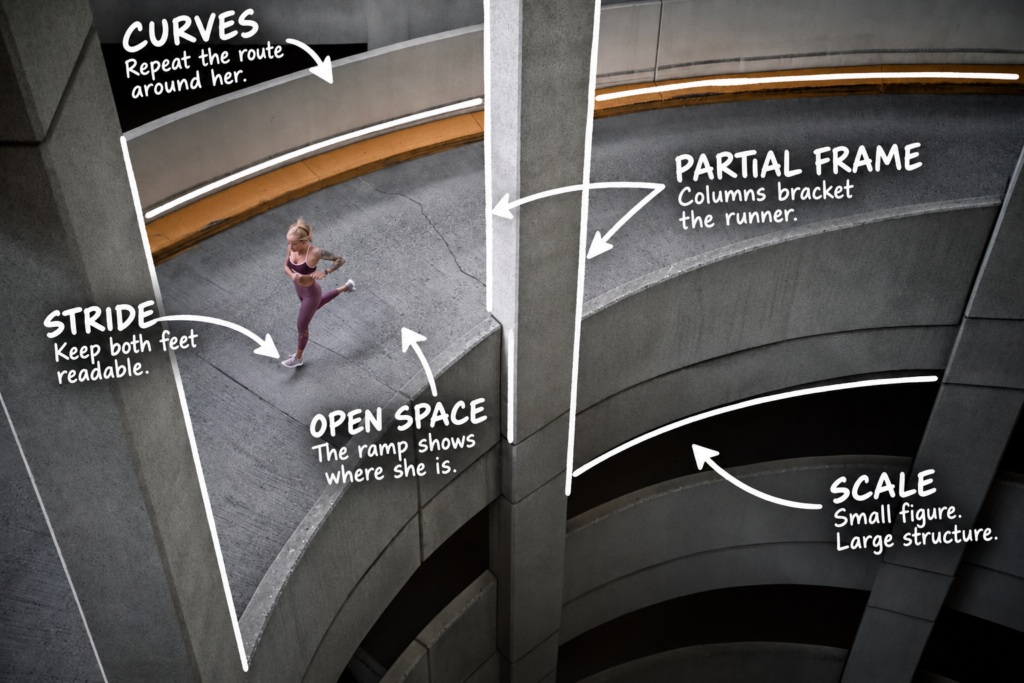
Thick white annotations identify the columns, curves, open ramp, visible stride, and scale in the runner photograph.
Look at the columns on either side of the runner. They create a partial frame inside the photograph. She sits between those boundaries, where the open ramp leaves her stride visible. A doorway, branches, or the opening between gym equipment can serve a similar purpose.
Find the opening first. Move until the person sits where you can read the activity. Watch the edges. A column that brackets a runner can help the picture. A column cutting through her face usually gives you another problem to solve.
2. Use Curves To Describe The Movement
The ramp’s curb and inner wall repeat the curve around the runner. They describe the route she occupies. That relationship gives the surrounding concrete a job. The photograph shows a person running through a particular space.
Look for a bend in a trail, a track, a shoreline, or a road. Change your height or position until enough of the curve remains visible to explain the activity. Leave the person’s movement readable.
3. Compare The Diagonals Around Your Subject
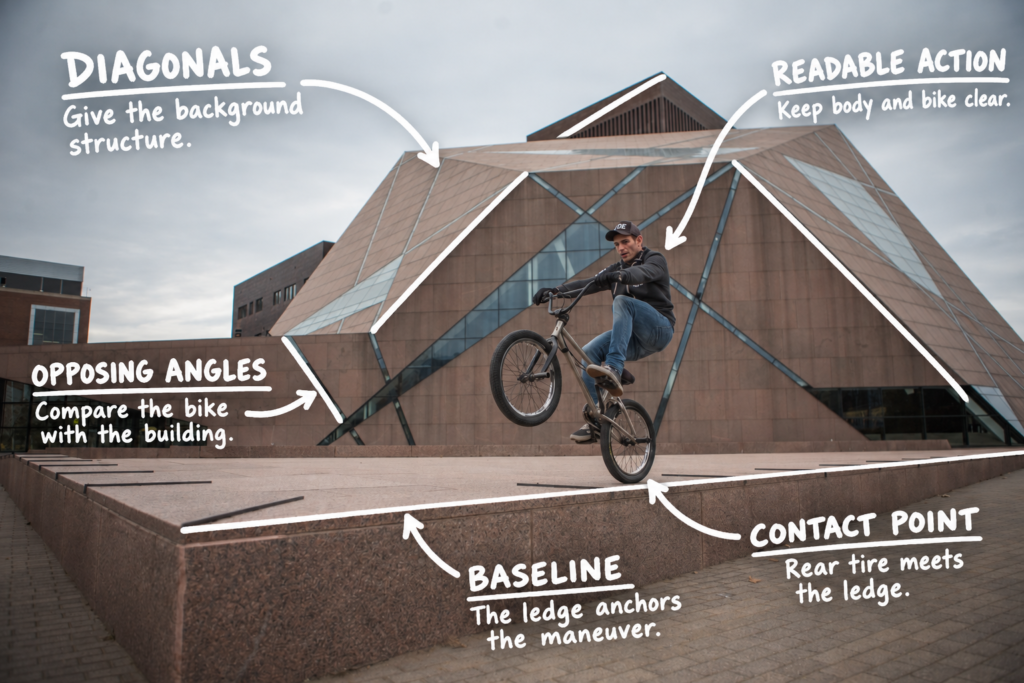
The annotations trace existing building diagonals and the platform edge. Separate notes identify the rider’s silhouette and rear tire contact point.
The BMX photograph works differently. The building’s seams run at opposing angles around the rider and raised front wheel. The bike supplies its own angles. The platform establishes the surface beneath the rear tire. You can see the maneuver and the structure around it.
Look beyond the biggest diagonal. Check where it crosses the person, a wheel, or a working hand. Move until the important parts remain clear. Strong lines can help organize a picture. They can also cut straight through the information you need.
4. Leave Enough Space To Explain The Scene
The runner is small compared with the ramp. That scale is useful. The concrete tells you about the space she’s moving through. In the BMX frame, the platform and building make the location part of the action.
Try a close view and a wider one. Compare what each explains. Keep the environment when it contributes. You don’t need to make the person the largest object in every photograph.
5. Use Composition Grids To Compare Your Options
A thirds grid divides the image into nine equal rectangles. It helps you compare the subject’s position with the space around it. Denser grids help check alignment. Diagonal and triangle guides help compare sloping relationships.
The golden ratio is approximately 1.618 to 1. A phi grid divides the frame at about 38.2 and 61.8 percent of its width and height. A golden spiral expands by that ratio each quarter turn. A curved ramp does not automatically make a photograph a golden spiral.
In Lightroom Classic, press R for Crop, O to cycle the overlays, and Shift plus O to change an overlay’s orientation where supported. Compare, then turn the guide off. The photograph still needs to communicate without the lines.
6. Check What Your Crop Removes
A 3:2 landscape, a 1:1 square, and a 4:5 portrait preserve different amounts of the scene. A full-height 4:5 crop of a 1200 by 800 pixel photograph keeps 640 pixels of width. You remove 560 pixels from the sides.
Check what disappears. Is it an irrelevant corner, or the column framing the runner? Does the BMX crop keep both wheels and the surface beneath the rear tire? Choose the shape around the information the photograph needs to carry.
7. Give The Viewer A Relationship They Can Recognize
In What Survives, Guide the Body examines how visible information works together inside the frame. Chapter 8, Visual Hierarchy and Reading the Frame, asks which relationships deserve attention and what competes with them. Geometry is one way I put those ideas to work.
I use resonance for the connection someone makes with a photograph. Echo is what they can explain or pass along afterward. ‘Those columns frame the runner, and the curve describes her route’ gives a response some language.
Try this on one of your photographs. Name the subject. Trace the strongest surrounding line. Cover part of the background. Did you remove a distraction or lose something that explained the scene? That gives you a specific decision to make on your next shoot.